
Keeping you informed on the markets, trends and how Freedom Advisors is serving you.
You can easily create a prospect in seconds through the Freedom Advisors platform. Once the prospect is established, you’re able to create an Investment Plan proposal in under 60 seconds. You can also create multiple proposals, if necessary as you progress with your prospective client. Watch the video or read the guide below.
Step 1: Add a Prospect in Contacts
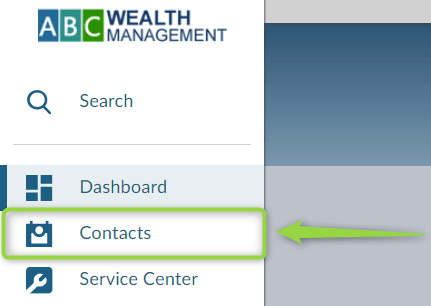
1. Navigate to the Contacts page.
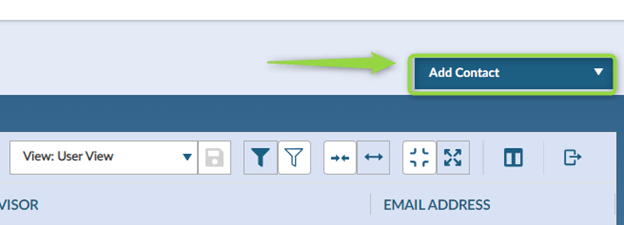
2. Click on Add Contact.
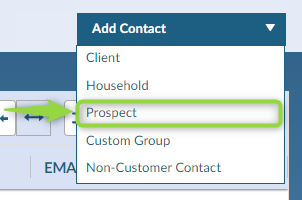
3. From the dropdown menu, select Prospect.
4. Fill in the required fields. Fields marked with an asterisk (*) are mandatory:

5. If you fill in additional fields it will save time later when creating the application.
6. Ensure the Advisor of Record is listed correctly. This will automatically default to the user creating the prospect but it must be the advisor.
7. After completing the form, click Create Prospect.

Step 2: Generate a Proposal for the Prospect
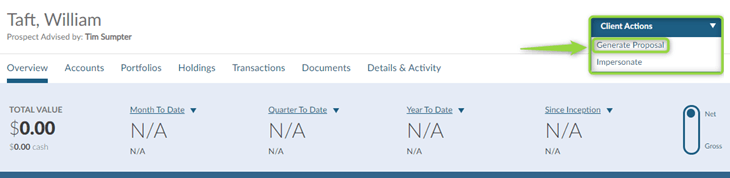
1. Once on the prospect’s profile, click the Client Actions dropdown in the top-right corner of the screen.
2. Select Generate Proposal from the dropdown.
Step 3: Fill Out Proposal Information
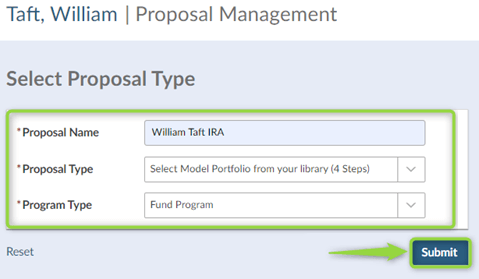
1. The Proposal Management tool will open.
2. In the Proposal Name field, enter the prospect’s name and the type of account being used for this Investment Plan.
3. Choose one of the following options:
Step 4: Select a Model
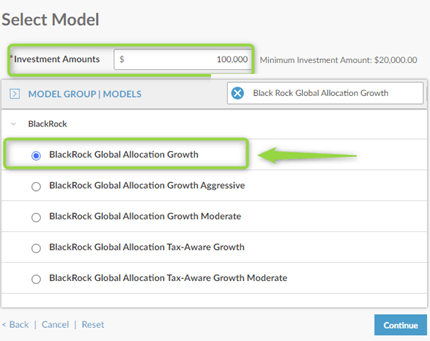
1. In this example, we’ll select the Fund Program.
2. Choose Blackrock Global Allocation Growth.
3. Enter the Investment Amount.
Step 5: Compare Proposal to Client's Current Portfolio
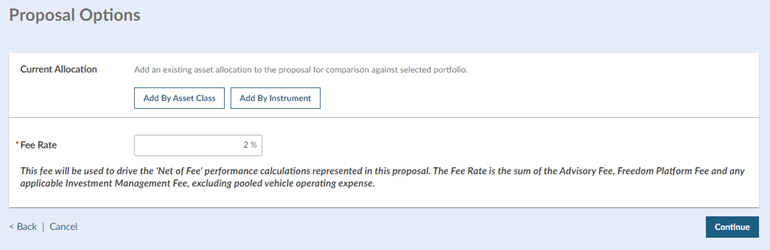
1. The Proposal Options tool allows you to compare the client’s current portfolio to what is being proposed.
2. Adjust Fee Rate, if necessary. This is used to calculate net performance in the proposal. The Fee Rate is the estimated sum of the Advisory Fee, Freedom Platform Fee, and any applicable Investment Management Fee, excluding pooled vehicle operating expenses, if any.
Step 6: Customize Plan Output
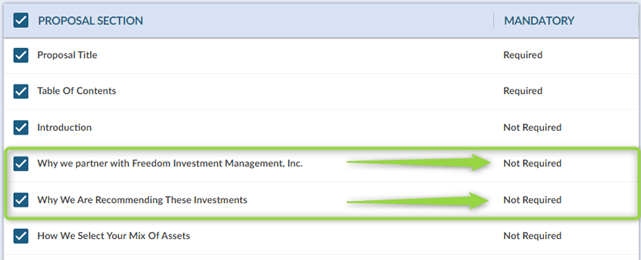
1. In the final step, you can adjust what is included in the PDF output.
2. Where “Not Required,” uncheck any boxes for sections you wish not to include.
3. Once all adjustments are made, click Generate Proposal.
If you need assistance, please contact your Freedom Advisors service team.
MT-620284

Freedom Advisors offers a turnkey asset management platform (TAMP) with a complete portfolio management solution, comprehensive outsourcing of operations, and high-touch service to help advisors run efficient practices and deliver superior outcomes for their clients.

This website is for investment professionals only. It is not intended for retail investors. Retail investors who are interested in our investment services should contact a financial advisor.
© Freedom Advisors. All rights reserved.
 860-291-1998
 Schedule Demo